0 ratings


Item #:
19035685
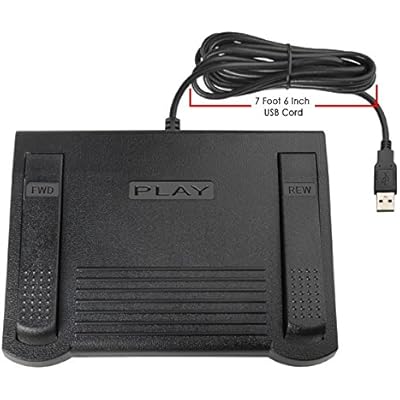
ECS USB Computer Foot Pedal for use with VLC Media Player
Item #:
19035685
PHP 4218
Price Details
Excluding Shipping & Custom charges ( Shipping and custom charges will be calculated on checkout )
*All items will import from US
0 ratings
Write a review
In stock
 Imported from USA store
QTY:
Only 1 item left in stock.
Order now and get it around Wednesday, June 24
Secured transaction
Ubuy works hard to protect your security and privacy. Our advanced payment security system ensures confidentiality by encrypting your information during transmission using AES (Advanced Encryption Standards) and SSL (Secure Socket Layer) protocols. Your payment details are 100% secure as we do not share your payment details with third party sellers.
Our Top Logistics Partners


The ECS-VLC-FP is a high-quality ergonomic USB foot pedal designed for ease of use and minimal foot fatigue.

Fast
Shipping

Free
Return*

Secure Packaging

100% Original Products

PCI DSS Compliance

ISO 27001 Certified


Note: Step Down Voltage Transformer required for using electronics products of US store (110-120). Recommended power converters Buy Now.


What Stands Out
Hands-Free Control
The ECS USB foot pedal allows users to control VLC Media Player hands-free, enhancing productivity while minimizing disruption, ideal for transcription tasks or anyone needing multitasking efficiency.
Plug and Play
This foot pedal offers a simple plug-and-play setup, making it user-friendly and compatible with various operating systems without the need for additional software installation.
Customizable Buttons
With customizable functions, users can tailor the pedal's buttons to their specific needs, providing personalized control for an optimized media playback experience.
Product Details
- Windows VLC Media Player–Only Compatibility – Specifically engineered for use with VLC Media Player on Windows PCs. Software not included and not compatible with IN-USB-1 software systems or transcription programs.
- Ergonomic, Heavy-Duty Construction – Designed for long-term comfort and durability, featuring a wide, sloped center pedal and internal precision switches rated for up to 2 million activations.
- Three-Pedal Playback Control Layout – Functional pedal assignments include left for fast forward, center for play/stop, and right for rewind, with VLC hotkeys configurable for additional features such as auto-backspace.
- Stable, Low-Profile Operation – Large pedal surface, mechanical stops, and a low-profile design help prevent accidental multi-pedal presses or cable disconnection during use.
| Compatible Devices | Personal Computer |
| Hardware Interface | USB |
| Microphone Form Factor | Built-In |
| Headphones Jack | No headphones jack |
| Item Weight | 2.1 Pounds (950 grams) |
| Brand | ECS |
| Model Number | ECS-VLCFP |
| Manufacturer | Executive Communication Systems |
| UPC | 819390021089 |
| Mfr Part Number | ECS-VLCP |
Who Should Buy?

-
Transcription Professionals
Ideal for transcriptionists who frequently use VLC to control playback and improve efficiency during audio or video transcription.
-
Video Editors
Beneficial for video editors needing hands-free control to start, pause, or rewind content while editing seamlessly.
-
Online Educators
Great for educators conducting live classes or recording lessons, allowing hands-free control over media playback during sessions.

-
Casual Users
Not suitable for casual users who rarely use VLC, as the foot pedal may be unnecessary for infrequent playback.
-
Mobile Users
Unsuitable for users who predominantly use laptops or mobile devices, as the pedal requires a stationary setup with a computer.
-
Gaming Enthusiasts
Not ideal for gamers as they typically require keyboard and mouse controls for interactive and dynamic gameplay experiences.
Product Description
About This Item
Introducing the ECS USB Computer Foot Pedal for use with VLC Media Player Take your media control to the next level with the ECS USB Computer Foot Pedal. Designed specifically for use with VLC Media Player, this three-button foot pedal is the perfect accessory for anyone looking to enhance their media playback experience. Ergonomic Design for Comfort and Convenience The ergonomic design of this USB foot pedal allows you to rest your foot comfortably while you work, eliminating any foot fatigue that may arise from extended use.
Its large size enables you to easily move your foot from the play/stop button to the fast forward and rewind keys, ensuring seamless control over your media playback. High Quality and Durable Construction Crafted with durability and longevity in mind, the ECS USB Computer Foot Pedal is built to last. Weighing 2.3 lbs, this foot control stays grounded with a greater surface footprint, minimizing any unintentional movement during use. You can trust that this foot pedal will keep up with your media control needs for years to come. Easy Configuration and Compatibility Installing the ECS USB Computer Foot Pedal is a breeze.
Simply configure it with VLC Media Player's settings program for seamless integration. Please note that this foot pedal is not compatible with Mac devices. Also, take note that software is not included with the purchase of this foot pedal. Please be aware that this foot pedal is not the IN-USB-2 model and will not work with any dictation or transcription software programs that are compatible with that specific model. Upgrade your media control experience with the ECS USB Computer Foot Pedal.
Take full command over your VLC Media Player and eliminate the need for manual control. Order yours today and enjoy a new level of convenience and ease while navigating through your favorite media content.
Have any Query? Chat with us
Customer Questions & Answers
-
Question:
What is the ECS USB Computer Foot Pedal?
Answer: The ECS USB Computer Foot Pedal is a versatile input device designed to enhance productivity while using software like VLC Media Player. It operates via a USB connection, making it compatible with a wide range of computers. This foot pedal allows users to control playback functions – such as play, pause, rewind, and fast forward – hands-free, making it particularly useful for transcription tasks, video editing, or presentations. By freeing up your hands, it allows you to focus solely on your work or creative projects. -
Question:
Can I use the ECS USB Foot Pedal with other media players?
Answer: Yes, while the ECS USB Computer Foot Pedal is specifically compatible with VLC Media Player, it can also work with other media players that support keyboard shortcuts. The pedal can be programmed to function with software like Windows Media Player, QuickTime, or even transcription software, enhancing your overall multimedia experience. This flexibility opens up various scenarios, such as transcription work for professionals, classroom presentations, or even therapeutic sessions where hands-free operation is needed. -
Question:
How do I set up the ECS USB Computer Foot Pedal?
Answer: Setting up the ECS USB Computer Foot Pedal is a straightforward process. Simply plug the USB connector into an available port on your computer. Most operating systems will automatically recognize the device and install any required drivers. After the setup, you'll need to configure the pedal's functions to your preference within VLC Media Player's settings or any other software you're using. This setup is especially beneficial for transcriptionists looking for a seamless workflow or video editors who need precise control without disrupting their focus. -
Question:
What features does the ECS USB Computer Foot Pedal offer?
Answer: The ECS USB Computer Foot Pedal boasts several features designed for convenience and user efficiency. It typically comes with multiple programmable pedals that can be customized for specific functions. The ergonomic design ensures comfort during extended use, reducing strain on your feet while working. Whether you're binge-watching your favorite series, conducting interviews, or editing video content, this pedal can drastically improve your workflow by allowing for efficient control of media playback. -
Question:
Is the ECS USB Foot Pedal compatible with Mac computers?
Answer: Yes, the ECS USB Computer Foot Pedal is compatible with both Windows and Mac operating systems. However, to optimize its functions on a Mac, you may need to tweak certain settings or install specific software updates. This cross-compatibility provides flexibility for diverse users, making it a perfect accessory for freelancers or content creators who switch between different devices, ensuring continuity in their workflow without being tethered to a mouse or keyboard. -
Question:
Does the ECS USB Computer Foot Pedal require any special software?
Answer: The ECS USB Computer Foot Pedal does not require any proprietary software to operate. It functions by utilizing the existing keyboard shortcut capabilities of the media software you are using. For optimal use, you may want to explore software options that allow you to customize the pedal's functions further. This is particularly beneficial for transcriptionists, editors, or educators who want complete control over video playback without taking their hands off the main tasks. -
Question:
What is the typical response time of the ECS USB Foot Pedal?
Answer: The ECS USB Computer Foot Pedal is designed for quick response times. Users can expect nearly instantaneous feedback from the pedal's functions, allowing for a seamless multimedia experience. This is crucial for tasks requiring precision, like video editing or transcription, where a delay could disrupt the flow of work. Its reliable response time is particularly advantageous in professional settings, enhancing productivity and minimizing interruptions. -
Question:
Can the ECS USB Foot Pedal be used in a gaming context?
Answer: While primarily designed for media control and productivity applications, the ECS USB Computer Foot Pedal can also be used in gaming scenarios where foot controls can offer an advantage. Gamers could assign certain functions to the pedal, such as activating abilities or using hotkeys, allowing for more freedom of movement and enhancing game performance. This unique application showcases the pedal's adaptability, making it not just a tool for media but also a potential enhancement for gaming experiences. -
Question:
Where can I buy the ECS USB Computer Foot Pedal in Philippines?
Answer: You can purchase the ECS USB Computer Foot Pedal from Ubuy, a reliable e-commerce platform that offers a wide selection of products. Ubuy provides an easy shopping experience and various shipping options to ensure that you get your foot pedal quickly. Whether for personal use or professional tasks, Ubuy is a convenient choice for acquiring this innovative device in Philippines.
ECS Pedals & Footswitches ECS-VLCFP Editorial Review
USB Foot Pedal for use with VLC Media Player The USB Foot Pedal for use with VLC Media Player is a unique product that allows users to control their media player hands-free. The foot pedal operates by sending hotkeys to the computer, which VLC for Windows can interpret and react to. It is an ideal accessory for those who need to edit transcripts, translate text, or transcribe audio files. Before using the foot pedal, users need to configure it on the VLC player settings program. The user guide is available under technical specification, and the manufacturer's customer support is reachable at (800) 644-9525 x 109 for additional support. One significant drawback to this foot pedal is that it is only compatible with VLC for Windows. Although VLC for macOS has hotkey functionality, it only works if the application is in front and active and cannot operate if VLC is in the background. Overall, the USB Foot Pedal for use with VLC Media Player is a useful accessory for professional transcriptionists, translators, or anyone who needs to control their media player without their hands.
Customer Reviews & Ratings
22 customers ratings
-
5 Star
44%
-
4 Star
16%
-
3 Star
9%
-
2 Star
0%
-
1 Star
31%
Review this product
Share your thoughts with other customers
Pros
- Hands-free media player control
- Ideal for transcription and translation work
- User guide available under technical specification
Cons
- Only compatible with VLC for Windows
Product Price History
Important information
- Limitations : For products shipped internationally, please note that any manufacturer warranty may not be valid; manufacturer service options may not be available; product manuals, instructions, and safety warnings may not be in destination country languages; the products (and accompanying materials) may not be designed in accordance with destination country standards, specifications, and labeling requirements; and the products may not conform to destination country voltage and other electrical standards (requiring use of an adapter or converter if appropriate). The recipient is responsible for assuring that the product can be lawfully imported to the destination country. When ordering from Ubuy or its affiliates, the recipient is the importer of record and must comply with all laws and regulations of the destination country.
- Not all the products listed on Ubuy are for sale, as Ubuy is a global search engine. Products are subject to export/trade regulations.
PHP 4218
Order now and get it around Wednesday, June 24
This item is not restrict in my country.(Please click on above link if this item is not restrict in your country, So our team will review and allow.)
QTY:
Only 1 item left in stock.
Secured transaction
Ubuy works hard to protect your security and privacy. Our advanced payment security system ensures confidentiality by encrypting your information during transmission using AES (Advanced Encryption Standards) and SSL (Secure Socket Layer) protocols. Your payment details are 100% secure as we do not share your payment details with third party sellers.
Our Top Logistics Partners
Fastest cross-border delivery